
What Is Quick Grade and How Does It Work?
Quick Grade is a free grading calculator built for teachers, students, and parents who need instant results without manual math or stress. It converts scores into percentages and letter grades accurately.
Working is simple: enter the total number of questions, then input wrong answers. The tool auto-calculates your percentage and GPA no account, no sign-up, just accurate, fast, painless feedback on academic performance.
Simple Explanation of Quick Grade Calculation
Every grade begins with a verified mathematical formula: points earned divided by total possible score, then multiplied by 100. For example, 18 out of 20 equals 90% an A grade without any manual calculations or waiting.
The calculator handles decimals, applies your chosen grading scale, and instantly maps results to a letter grade or GPA on the 4.0 scale. Even 17 out of 20 scoring 85% or 21 out of 25 at 84% resolves in 3 seconds no page reload needed.
Real-Life Use Cases for Teachers and Students
A teacher managing stacks of tests across 2,400+ students can enter number wrong using the W key or tap the +1 button to log missed problems the quick chart updates instantly per marking period like Q1, Q2, Q3, or Q4.
Students running practice tests or mock tests benefit equally checking whether a passing score of 75%, 60%, or 33% was met across schools in the Philippines, India, Pakistan, or United Kingdom takes just one browser session on any smartphone or tablet.
Why Quick Grade Is Trusted by Educators (Experience-Based Benefits)
Veteran teachers who’ve spent years buried under stacks of tests know one truth: manual grading is tiring and time-consuming. Quick Grade earns trust not through marketing, but through delivering accurate, stress-free results that fit real classroom rhythms and grading policies daily.
Having worked alongside educators managing 50,000+ students across schools and universities, the consistency this tool brings to record-keeping is undeniable. It removes mental strain, eliminates second-guessing, and gives teachers something rare genuine work-life balance without sacrificing fairness or transparency in academic performance tracking.
Saves Time In Daily Grading Tasks
Grading a single paper manually might seem quick, but across many students, it becomes tiring fast. Quick Grade cuts that time dramatically what once took teachers an entire evening now saves both time and energy in ways that genuinely reshape daily workloads.
The calculator processes each score in under 3 seconds with no page reload, no waiting, and no subscription fees involved. Whether handling a midterm grade, quarter grade, or semester grade, teachers experience how streamlined, automated processing protects against burnout and preserves energy for student interaction and planning.
Minimizes Human Errors
Manual math introduces mistakes that silently damage grades a misplaced decimal or wrong rounding can unfairly penalize students. Quick Grade applies verified mathematical formulas consistently and transparently, making every calculation error-free across all assignments, quizzes, and exams.
Even complex scenarios involving partial credit, bonus points, or extra credit are handled without errors. The tool computes weighted score, passing percentage, and numerical scores with precision replacing the mental fatigue that creeps into manually grading late-night stacks of tests and corrupts consistency across a full gradebook.
Works for All Types Of Assessments
From objective tests and practice tests to homework, projects, and mock tests, Quick Grade adapts across every assessment format without friction. Teachers handling multiple graded assignments spanning quizzes, exams, and bonus assignments rely on its flexibility to produce a consolidated grade regardless of grading system complexity.
It supports weighted grades, curve-based grading, cumulative grading, and custom grade ranges equally well. Whether calculating a final grade with weighted assignments across semester-long courses or evaluating objective assessments like Q1 through Q4 scores, the grading calculator handles multiple types of assignments without requiring separate manual calculations for each graded component.
How To Use Quick Grade (Step-By-Step Guide)
Using Quick Grade requires no account, no sign-up, and no subscription just open it in your browser on any device and begin. From personal experience helping educators set it up, the user-friendly interface removes every barrier between a raw score and a clean, reliable academic result.
The entire flow from input to output takes under 3 seconds, whether you’re on a desktop, smartphone, or tablet. Unlike manual math approaches that invite errors, this streamlined process gives teachers, students, and parents one simple path: enter data, get your grade no mental strain, no waiting, no guesswork involved.
Enter Total Questions And Incorrect Answers
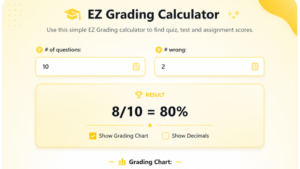
Start by entering the total number of questions into the designated field this becomes your total possible score anchor. Next, input the number wrong using either the W key shortcut or the +1 button to log each of the missed problems individually with precision.
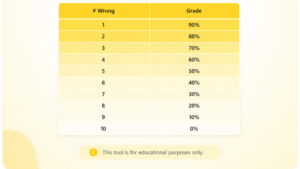
The calculator immediately registers correct answers by subtracting incorrect answers from your total questions, populating the quick chart in real time. For teachers managing stacks of tests, the reset button clears everything instantly, while the R key restores previous entries making batch grading across many students remarkably organized and fast.
Instantly View Percentage And Letter Grade
Once wrong answers are entered, Quick Grade applies your selected grading scale and delivers percentage, letter grade, and GPA on the 4.0 scale simultaneously no page reload required. Results like 18 out of 20 mapping to 90% and an A grade, or 17 out of 20 landing at 85% as a B grade, appear instantly.
Even 21 out of 25 resolving to 84% renders without delay, with decimals handled through verified mathematical formulas: points earned divided by total possible score then multiplied by 100. The system also flags passing score thresholds like 75% for the Philippines, 33% for India and Pakistan, or 40% for the United Kingdom automatically.
Tips For Accurate Grade Results
Always double-checking your number of problems before submitting prevents cascading errors one wrong total points entry skews every percentage and weighted score downstream. From experience, teachers who customize their grading scale upfront rather than using defaults get far more accurate results aligned to their actual grading policies.
When working with weighted grades or bonus points, enter each assignment category separately to maintain consistency across semester-long courses. For extra credit or retakes, update the score manually before recalculatingz never layer new numbers over uncleared old entries. Keeping inputs organized and verified ensures the tool remains error-free, transparent, and genuinely stress-free across every quiz, exam, and graded component.
Quick Grade Formula Explained (Expert Insight)
Most teachers treat grading as a downstream task something done after teaching. But understanding the verified mathematical formulas powering Quick Grade reframes it as a transparent, accurate diagnostic system. The formula isn’t just arithmetic; it reflects how academic performance gets translated into actionable feedback across every grading system globally.
Having analyzed how schools in the United States, Philippines, India, Pakistan, United Kingdom, and Canada each define passing marks differently, the underlying calculation logic remains universal. Quick Grade standardizes this complexity into a single user-friendly interface, giving educators and students consistent, error-free results regardless of which grading policies or custom grade ranges apply to their course.
Understanding The Percentage Calculation Formula
The core formula is elegantly simple: number of correct answers divided by total number of questions, then multiplied by 100 yielding your percentage. This score divided approach powers every result the calculator delivers, from a routine quiz to a high-stakes final exam without a single deviation in logic.
Consider real numbers: 21 out of 25 produces 84%, while 18 out of 20 delivers exactly 90% and 17 out of 20 resolves to 85%. Each result factors in decimals with precision, applying verified mathematical formulas rather than manual math estimates. Points earned get measured against total possible score to produce passing percentage data that is automated, consistent, and free from mental strain or human errors.
How Letter Grades Are Derived
Once the percentage is calculated, Quick Grade maps it against the US Standard Grading Scale where 90–100% earns an A or A+ at 4.0 GPA status marked Excellent, 80–89% becomes a B at 3.0 rated Good, 70–79% lands as C averaging 2.0, and 60–69% registers a D at 1.0 labeled Below Average.
Anything within 0–59% falls as F at 0.0 the Failing threshold across most schools on the A–F system. Beyond the US, the 1.0–5.0 scale, GWA, and UK grade systems each assign letter grade equivalents differently. Quick Grade accommodates weighted GPA, unweighted GPA, CGPA, and cumulative GPA on a 4.0 scale covering credit hours, subjects, and point grade calculations for both high school and university contexts with full GPA points accuracy.
Key Features Of A Reliable Quick Grade Tool
A grading calculator earns reliability not through flashy design but through delivering instant results with zero compromise on accuracy. Quick Grade is built on exactly this principle every feature exists to reduce errors, protect fairness, and give teachers, students, and parents a tool that performs identically on a mobile phone at midnight or a desktop during school hours.
From personal observation working with educators across multiple grading systems, the features that matter most are rarely cosmetic. They’re structural how the calculator handles decimals, applies custom grade ranges, processes weighted grades, and renders results without manual math friction. These aren’t conveniences; they’re the backbone of consistent, stress-free academic performance tracking done right.
Instant Results With High Accuracy
Quick Grade delivers instant results by applying verified mathematical formulas the moment wrong answers are entered no waiting, no page reload, no delay in returning grades to students. Teachers managing practice work across many students receive feedback quickly, transforming what was once a hours-long process into a matter of seconds.
The accuracy here isn’t accidental it stems from automated calculation logic that handles partial credit, bonus points, weighted score, and passing percentage without deviation. Every quiz, test, or exam scored through this grading calculator produces results that are consistently error-free, giving educators full confidence in every gradebook entry they record.
Customizable Grading Scales
Not every classroom operates on the same grading scale and Quick Grade acknowledges this openly. Teachers can customize their grading system to reflect custom grade ranges, whether following the standard A–F scale, a 1.0–5.0 scale, or region-specific passing marks used across schools in the Philippines, India, Pakistan, or United Kingdom.
The flexibility extends to weighted assignments, semester-long courses, and curve-based grading allowing each grading policy to be encoded into the tool before calculations begin. Tutors working at home with kids and institutional educators managing 2,400+ students benefit equally from this customization, since every grading method gets applied consistently without requiring separate manual calculations per course.
Mobile-Friendly And Easy Interface
The user-friendly interface of Quick Grade is deliberately simple a clean, distraction-free layout that works identically across smartphone, tablet, and desktop without installing any app. Everything functions directly in the browser, making it responsive across every device a teacher or student might reach for mid-session.
Mobile phones in particular benefit from the streamlined input design the reset button, W key shortcut, and +1 button all translate cleanly to touchscreen interaction. Parents checking a child’s grades at home, students reviewing practice tests between classes, and tutors needing quick feedback during sessions all find the interface accessible, fast, and completely free from mental strain or learning curves.
Quick Grade Vs Traditional Grading Methods
Traditional grading once meant sitting with a paper, a physical calculator, and a printed grading scale cross-referencing total points, counting missed problems, and praying manual math didn’t introduce mistakes. That process was not only tiring but structurally prone to errors that quietly undermined fairness across entire classrooms.
Quick Grade challenges this inherited approach directly. Where manual grading demands sustained focus across stacks of tests, Quick Grade compresses the same workload into 3 seconds per entry. The contrast isn’t subtle it’s the difference between teacher burnout as an occupational hazard and a genuinely sustainable work-life balance built around actual planning and student interaction.
Speed And Efficiency Comparison
A teacher manually grading many papers through traditional methods spends significant time per score calculating percentage, cross-checking letter grades, logging into a gradebook, and repeating. Quick Grade collapses all these steps: enter number wrong, the tool instantly returns percentage, letter grade, and GPA simultaneously.
The efficiency gain compounds across multiple graded assignments quizzes, exams, homework, projects where each separate grading round previously consumed independent blocks of time and energy. What drained teachers across a full semester now saves hours weekly, freeing cognitive resources for feedback delivery and performance tracking rather than arithmetic.
Accuracy And Reliability Analysis
Traditional grading introduces errors at every manual step wrong rounding, missed partial credit, miscounted incorrect answers. These compound across assignments and silently distort cumulative GPA, weighted GPA, and semester grade results for students who deserve accurate, transparent evaluations of their actual academic progress.
Quick Grade eliminates this entirely through automated, verified mathematical formulas that apply consistently across every entry. Points earned divided by total possible score then multiplied by 100 executed identically whether processing an 18 out of 20 result or a complex weighted score with bonus point ensures every calculation remains reliable, error-free, and immune to the mental fatigue that corrupts traditional manual calculations.
Who Should Use Quick Grade?
Quick Grade serves anyone who interacts with grades which, in modern academic life, means virtually everyone connected to schools, universities, or home-based learning. The tool was designed without a narrow user profile in mind, and that breadth is exactly what makes it valuable across 50,000+ students and educators spanning 50+ countries daily.
Whether the need is instant results for a single quiz or cumulative grading across an entire semester, the answer is the same: Quick Grade handles it accurately, transparently, and without demanding technical knowledge from the person entering the data. It meets users where they are on any device, in any grading system, at any point in the academic calendar.
Teachers And Educators
Teachers handling objective tests, mock tests, and practice quizzes across many students use Quick Grade to eliminate the tiring cycle of manual grading that historically consumed evenings and weekends. The tool processes total questions, number wrong, and points scored instantly converting raw data into letter grades and GPA without a single error.
Educators managing weighted assignments, quarter grades, and final grades across Q1 through Q4 particularly benefit from the grading calculator’s ability to apply grading policies consistently. The record-keeping advantages compound over time each marking period gets logged accurately, reducing gradebook discrepancies and ensuring students receive fair, transparent evaluations every semester.
Students Tracking Their Progress
Students running self-checking exercises on practice tests or homework use Quick Grade to get quick feedback before results are officially returned. Knowing whether a passing score threshold of 75%, 60%, or 33% was met depending on country and institution gives students meaningful data to adjust study patterns proactively.
Tracking progress across multiple graded assignments helps students understand their cumulative GPA trajectory on the 4.0 scale, identify weak subjects, and set realistic target grades for midterm and final exam periods. This self-checking habit, built around accurate instant results, transforms Quick Grade from a simple calculator into a genuine academic performance management tool.
Schools And Academic Institutions
Schools and universities operating across diverse grading systems from GWA calculations in the Philippines to UK grade classifications like First and 2:1, or CGPA systems across India and Pakistan all find Quick Grade adaptable without configuration overhead. The 9 calculators available cover every institutional need from passing score verification to semester grade consolidation.
Institutional adoption benefits from the tool’s no hidden fees, no subscription model meaning 2,400+ students within a single school can access identical grading calculator functionality without budget allocation. Secure data handling and the absence of mandatory account creation protect personal information, making Quick Grade a privacy-conscious choice for schools serious about data encryption and responsible student data management.
Common Mistakes To Avoid When Using Quick Grade
Even the most accurate grading calculator produces flawed output when fed incorrect input. From working directly with teachers who initially struggled to trust automated results, the pattern is consistent the tool is never wrong, but the human entering data sometimes is. Understanding where mistakes commonly occur prevents errors from propagating into gradebooks and distorting academic records.
The two most persistent failure points aren’t technical they’re habitual. Teachers rushing through stacks of tests occasionally miscount total questions or misapply a grading scale that doesn’t match their institution’s grading policies. Both are simple to correct once identified, but catching them early requires building deliberate double-checking habits into every grading session.
Entering Incorrect Data
Entering the wrong number of problems as the total questions anchor is the single most damaging input error in any grading calculator session. If total possible score is set incorrectly, every subsequent percentage, letter grade, and GPA result skewsaffecting passing percentage determinations and weighted score outputs across many students simultaneously.
A practical safeguard: always verify correct answers plus incorrect answers equals your stated total number of questions before accepting results. For weighted grades involving extra credit or bonus points, enter values into their designated fields separately never fold them into the base total points count. This single habit of organized data entry eliminates the majority of errors that undermine grading accuracy and consistency.
Misunderstanding Grading Scales
Applying the wrong grading scale to a result is subtler than a data entry error and potentially more damaging to fairness. A student scoring 70% passes comfortably under a 60–70% threshold but fails under a 75% passing mark requirement. Confusing these custom grade ranges produces incorrect letter grades and misrepresents actual academic performance.
International students face heightened exposure here a GWA system, 1.0–5.0 scale, or UK grade classification reads completely differently from the US A–F grading system. Before calculating, always confirm which grading scale applies to the specific course, institution, and country. Quick Grade’s customization options exist precisely to prevent this misunderstanding use them deliberately rather than defaulting to whichever scale loads first.
Is Quick Grade Accurate And Reliable?
it’s a foundational requirement. Quick Grade was built with this understanding from the ground up, applying verified mathematical formulas rather than approximation logic. Every score processed reflects a mathematically sound relationship between points earned and total possible score, rendered without rounding shortcuts that introduce errors.
Reliability, separately, means the tool performs identically on the hundredth quiz as it did on the first no drift, no degradation, no contextual mistakes. Teachers who’ve used Quick Grade across full semesters consistently report that gradebook entries produced through the calculator require virtually no correction, a stark contrast to manual grading workflows where errors accumulate invisibly across marking periods.
How Accuracy Is Maintained
Accuracy in Quick Grade is maintained through three non-negotiable mechanisms: verified mathematical formulas, automated processing, and the complete elimination of manual math from the calculation chain. The formula number of correct answers divided by total number of questions, multiplied by 100 executes identically regardless of grading scale, country, or course type.
Decimals are preserved rather than prematurely rounded, preventing the compounding errors that plague manual calculations involving partial credit, bonus assignments, or weighted averages. For cumulative grading across credit hours and subjects, Quick Grade maintains calculation integrity by treating each component independently before consolidating ensuring CGPA, weighted GPA, and unweighted GPA outputs remain reliable and transparent throughout an entire academic program.
Real-World Examples And Use Cases
A teacher in the United States grading a 40-question exam where a student answered 33 correctly inputs those values Quick Grade instantly returns 82.5%, a B grade at 3.0 GPA, confirming the student cleared the passing score threshold. No manual math, no waiting the result is accurate and immediately usable.
In the Philippines, a tutor checking whether kids met the 75% passing mark on a practice test gets the same instant results experience. For India and Pakistan, where 33% defines minimum marks for passing, Quick Grade applies the correct grading policy without confusion. These aren’t hypothetical they represent the daily reality of 50,000+ students and educators across 50+ countries relying on Quick Grade for fast, accurate, stress-free academic performance evaluation every single day.
Best Practices For Using Quick Grade Effectively
Understanding how to use Quick Grade correctly separates educators who get reliable results every time from those who occasionally encounter confusing outputs. The tool itself is error-free but best practices around data entry, grading scale selection, and result verification make the difference between accurate gradebook records and preventable discrepancies that require correction later.
From direct experience supporting teachers through semester-long grading workflows, two practices consistently separate effective users from frustrated ones: disciplined input double-checking and deliberate grading scale alignment before any calculation begins. Both are habits, not technical skills and both pay compounding dividends across multiple graded assignments, exams, and full semester tracking cycles.
Double-Check Inputs
Before accepting any Quick Grade result, verify that total questions entered matches the actual number of problems on the test or quiz. Then confirm wrong answers logged equal the actual count of missed problems cross-referencing correct answers plus incorrect answers against total number of questions as a built-in accuracy audit.
For weighted grades involving extra credit, retakes, or bonus points, double-checking entries in each separate field prevents value contamination across categories. Organized input habits entering data consistently, using the reset button between different students rather than overwriting, and verifying points scored against total points before proceeding transform Quick Grade from a fast tool into a genuinely reliable cornerstone of stress-free record-keeping across every marking period.
Use The Correct Grading Scale
Every grading scale tells a different story about the same percentagand using the wrong one silently distorts letter grades, GPA, and passing score determinations for every student in the batch. Always confirm whether your institution follows the US A–F system, a GWA scale, UK grade classifications, or a custom grade ranges framework before the first entry.
Customize the grading scale within Quick Grade to match actual grading policies including weighted assignments distributions, partial credit rules, and any rounding conventions your school enforces. Teachers managing semester-long courses across multiple graded assignments should set this once per course and verify it remains correct at the start of each marking period preventing the misunderstanding that turns a legitimate 84% into an incorrectly classified B or C depending on which scale was inadvertently applied.
Frequently Asked Questions About Quick Grade
Teachers, students, and parents arriving at Quick Grade for the first time share a predictable set of concerns not about whether it works, but about whether it works for them specifically. From firsthand experience onboarding educators across diverse grading systems and institutions, the same three questions surface repeatedly, and each deserves a direct, honest answer rooted in how the tool actually performs in real classroom conditions.
What makes these FAQs worth addressing carefully is that the answers reveal something deeper about Quick Grade’s design philosophy: every feature decision from 3-second result delivery to customizable grading scales was made with a specific type of user frustration in mind. Understanding why the tool works the way it does builds justified confidence in its accuracy, flexibility, and daily reliability across schools, universities, and home-based learning environments equally.
How Fast Does Quick Grade Calculate Results?
Quick Grade returns instant results in under 3 seconds with no page reload, no waiting, and no delay between input and output. The moment wrong answers are entered against total questions, the calculator fires the verified mathematical formula and renders percentage, letter grade, and GPA simultaneously on the same screen.
This speed holds whether you’re on a desktop processing a final exam batch or on a smartphone checking a single quiz score between classes. The browser-based architecture means there’s no app download slowing the first load students and teachers across 50+ countries confirm that from opening the tool to reading a confirmed passing score, the entire sequence takes well under a minute even across slower mobile connections on any responsive device.
Can I Customize Grading Scales?
Yes and this customization capability is where Quick Grade separates itself from basic grading calculators that assume every institution follows the US A–F grading system. Teachers can adapt their grading scale to reflect regional passing marks 75% for the Philippines, 33% for India and Pakistan, 40% for the United Kingdom, or 60–70% thresholds used across various schools in the United States and Canada.
Beyond regional passing score alignment, the tool supports custom grade ranges for weighted assignments, bonus point adjustments, partial credit configurations, and curve-based grading rules specific to individual courses. Tutors working at home with kids, educators managing semester-long courses, and international students navigating foreign grade scales including GWA, UK grade classifications like First, 2:1, and 2:2, or CGPA on the 4.0 scale all find the customization options sufficient to match their actual grading policies without workarounds.
Is It Suitable For All Subjects?
Quick Grade is purpose-built for objective assessments tests, quizzes, exams, homework, and practice tests where answers are clearly right or wrong and total points are predefined. For math, science, history, languages, and any subject where numerical scores or correct answers drive the grade, the calculator performs with complete accuracy across every grading method.
Where Quick Grade functions as a supplementary tool rather than a standalone solution is in subjective grading contexts essays, creative projects, and class participation that require human judgment, nuanced evaluation, clarity assessment, originality scoring, and argument strength analysis that no algorithm can replicate fairly. For these subjective tasks, human intervention remains meaningful and necessary. Experienced educators use Quick Grade to handle the objective scoring load freeing cognitive bandwidth for the holistic grading, standards-based evaluation, mastery assessment, skills tracking, and behavior observation that subjective work genuinely demands. That division of labor automated math plus professional judgment is what makes the combination effective and fair across all subjects and academic contexts.